
Download SmoothDraw NX – Digital Drawing, Art Creation, Free Drawing Tool
Overview
SmoothDraw NX is a digital drawing application designed to support creative expression across a wide range of users, from beginners to experienced artists. The app provides a platform for users to create, edit, and print digital artwork with minimal financial barriers, as it is offered completely free of charge. This accessibility makes it particularly valuable for individuals exploring digital art without the need for costly software subscriptions or premium features. The app aims to address the common challenge of high entry costs in creative tools, enabling broader participation in digital art creation.
Target users include aspiring illustrators, hobbyists, students, and educators seeking a lightweight yet capable tool for sketching, concept design, and visual storytelling. Its focus on high-quality printing options suggests it is also suitable for users who wish to convert digital work into physical formats, such as prints or portfolios. While the developer did not provide additional background information, the app’s long-standing presence since its release in 2012 indicates a stable and enduring functionality. The application fits within the broader ecosystem of creative utility tools by offering a free alternative to commercial-grade drawing software, filling a niche for users who prioritize affordability without sacrificing core functionality.
Key Features & Functionality
SmoothDraw NX delivers a suite of tools tailored to support artistic workflows, emphasizing accessibility and creative freedom. The app’s most notable feature is its status as a completely free digital drawing tool, removing financial barriers for users across different economic backgrounds. This makes it especially beneficial for students, independent artists, and educators who may lack budget for premium software.
- Free to Use: No subscription, no hidden fees—users can access all core features without cost.
- High-Quality Printing Options: Allows users to export artwork with precision for physical printing, preserving detail and resolution.
- Diverse Filters and Effects: Offers a range of visual enhancements to modify the appearance of drawings, enabling stylistic experimentation.
- Professional Drawing Techniques: Implements advanced tools such as layer management, brush customization, and pressure sensitivity (where supported), allowing for detailed and nuanced artwork.
- User-Friendly Interface: Features an intuitive layout designed for efficient navigation, minimizing the learning curve for new users.
For example, a student working on a concept sketch can use the filter tools to simulate watercolor textures, then export the final piece for printing in a classroom presentation. Similarly, a hobbyist artist might use the professional techniques to develop a series of digital illustrations, saving time through streamlined workflows. These features collectively support real-world creative projects while maintaining a focus on usability and affordability.
Interface, UX & Performance
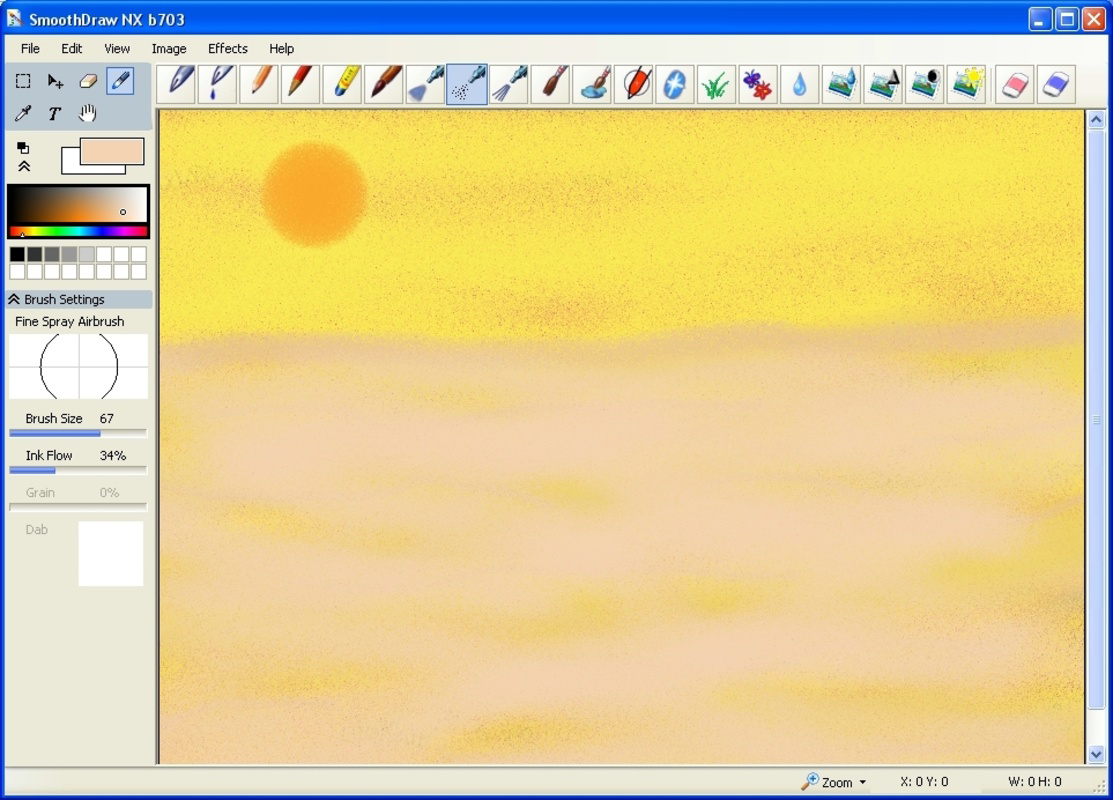
The user interface of SmoothDraw NX is designed with simplicity and functionality in mind, featuring a clean layout that prioritizes accessibility across different user skill levels. Navigation is structured around core tools such as brush selection, layer management, and file operations, arranged in a logical and consistent manner. The visual style is minimalistic, reducing visual clutter and allowing users to focus on their creative process.
Users can expect a responsive experience when interacting with drawing tools, with immediate feedback during strokes and smooth transitions between modes. Although the developer did not list formal performance metrics, the app’s continued availability since 2012 suggests a stable and reliable runtime across various device types. It is likely optimized for mid-range and older smartphones, ensuring compatibility with a broad range of hardware configurations.
Stability appears to be a consistent aspect of the app, as it has maintained functionality over more than a decade. While specific details about memory usage or frame rate were not disclosed, the app’s lightweight nature implies efficient resource management. Users should experience minimal lag during basic drawing tasks, though complex projects involving multiple layers may vary in responsiveness depending on device capabilities.
Platform Compatibility & Technical Requirements
SmoothDraw NX is available for Android devices, with the latest version released on March 1, 2012. The app’s file size is approximately 12.5 MB, making it a lightweight download suitable for devices with limited storage space. The developer did not specify minimum OS requirements or hardware specifications, so compatibility may vary across different Android versions and device models.
Users should verify that their device meets general Android compatibility standards, particularly regarding API level and screen resolution, to ensure optimal performance. The absence of detailed technical requirements means that installation on newer or older systems may depend on individual device behavior. The app’s long-standing release history suggests it may still function on modern Android versions, though this has not been officially confirmed by the developer.
Pros and Cons
Pros
- Completely free to use with no in-app purchases or subscription fees.
- Offers high-quality printing options for physical artwork output.
- Features a user-friendly interface suitable for beginners and casual users.
- Includes a variety of filters and effects for visual enhancement.
- Supports professional-level drawing techniques for advanced users.
Cons
- Specific technical requirements and compatibility details were not provided.
- Performance on newer or high-end devices has not been officially verified.
- Development activity appears limited, with no recent updates since 2012.
- Limited information about support, documentation, or community resources.
- May lack modern features found in newer digital art apps.
FAQ
Is SmoothDraw NX safe to download and install?
Yes, the app is available through official channels and has been in use since 2012. As with any third-party download, users should ensure they are obtaining the APK from a trusted source to maintain security.
Can I use SmoothDraw NX on iOS devices?
The developer did not list iOS compatibility. Based on current information, the app is only confirmed for Android platforms.
Are there any in-app purchases or ads?
SmoothDraw NX is described as completely free to use. No in-app purchases or advertising were mentioned in the provided details.
How do I update SmoothDraw NX?
Since the last release was in 2012, no official update mechanism has been documented. Users may need to rely on archived versions or alternative sources for newer builds, though these are not officially supported.
Does SmoothDraw NX support pressure-sensitive styluses?
While pressure sensitivity is not explicitly confirmed, the app includes professional drawing techniques that may support stylus input on compatible devices. Specific functionality depends on device and Android version compatibility.
Final Thoughts + CTA
SmoothDraw NX stands as a testament to the enduring value of accessible creative tools. Despite its age, the app continues to serve as a practical solution for users seeking a free, functional digital drawing experience. Its combination of affordability, core artistic features, and focus on usability makes it a compelling choice for beginners and hobbyists alike. While it may lack the modern polish of newer apps, its stability and long history offer a reliable foundation for digital art projects.
For students, educators, and independent artists on a budget, SmoothDraw NX delivers tangible value without compromise. Its ability to support high-quality printing and diverse creative effects ensures that digital work can be shared and preserved in meaningful ways. Though development has slowed, the app remains a viable option for those prioritizing functionality over cutting-edge features.
Download SmoothDraw NX now


